
Music Alarm Megalarm Lite1.8.0 - Google Play
You'll be able to see results in few seconds.
Publisher Description
For bug reports, please email me instead of leaving (incomplete) information in the ratings. This is ensure that I can fix them rapidly and if necessary ask for more info. Thank you!
Wake up with a random song each morning with the music alarm clock Megalarm!
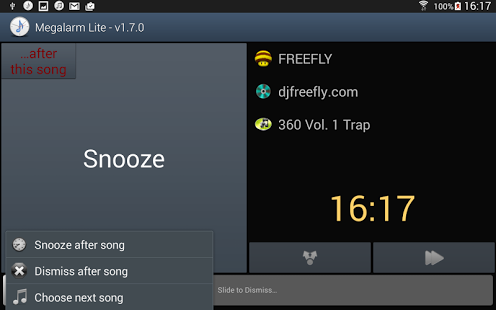
Simply group your favorite Artists, Albums, Genres, Playlists and/or Songs into a Music Library. Then create an alarm and associate a Music Library to it. Now wake up to new music each day. No need to hear the same song (or ringtone... even worse) every morning. And if you don't like the song playing, just skip to the next one, or choose the next song from your music library that you want to hear!
Available in:
- English
- French
- Spanish
- Dutch
- German
- Italian
I am very reactive with bug fixes and always eager to hear ways to improve it. Please rate the app if you like it (or don't), constructive criticism always helps. However, if despite my many nights and (more appropriately mornings) of testing it happens to crash or misbehave with you, please write me and give me a chance to fix the problem before leaving negative ratings. You'll find a crash report on the SD card in the Logs folder, please include that with your message, it will help me out greatly.
It is worth mentioning that there are some really big improvements are coming for the 2.0 version. Stay tuned!
The app needs some special permissions on the phone to work. I assure you no monkey business is going on. The permissions are explained below:
* android.permission.VIBRATE:
So the alarm can vibrate (if you want it to) when it rings.
* android.permission.WAKE_LOCK:
This is to wake up the phone from a sleep state when the alarm rings so that we can play music and activate the screen.
* android.permission.DISABLE_KEYGUARD:
So that once the alarm starts ringing, we can bypass the lock screen and display the ringing screen immediately.
* android.permission.RECEIVE_BOOT_COMPLETED:
To initialize the alarms (if any are active) once the phone is turned on (or rebooted).
* android.permission.READ_PHONE_STATE:
So as not to ring the alarm if you're on the phone. It will wait till you've finished your call to go off.
* android.permission.READ_EXTERNAL_STORAGE:
* android.permission.WRITE_EXTERNAL_STORAGE:
Needed as of KitKat (Android 4.4) to play music from the sdcard
Enjoy!!
*****
If you are migrating from a version earlier than v1.1.0 to a later version, you will lose your data. This was to provide the ability to conserve data when migrating from the lite to the full version. I'm very sorry, this shall not happen again.
*****
About Music Alarm Megalarm Lite
The company that develops Music Alarm Megalarm Lite is seandroid. The latest version released by its developer is 1.8.0.
To install Music Alarm Megalarm Lite on your Android device, just click the green Continue To App button above to start the installation process. The app is listed on our website since 2018-02-27 and was downloaded 0 times. We have already checked if the download link is safe, however for your own protection we recommend that you scan the downloaded app with your antivirus. Your antivirus may detect the Music Alarm Megalarm Lite as malware if the download link to com.seandroid.megalarm.lite is broken.
How to install Music Alarm Megalarm Lite on your Android device:
- Click on the Continue To App button on our website. This will redirect you to Google Play.
- Once the Music Alarm Megalarm Lite is shown in the Google Play listing of your Android device, you can start its download and installation. Tap on the Install button located below the search bar and to the right of the app icon.
- A pop-up window with the permissions required by Music Alarm Megalarm Lite will be shown. Click on Accept to continue the process.
- Music Alarm Megalarm Lite will be downloaded onto your device, displaying a progress. Once the download completes, the installation will start and you'll get a notification after the installation is finished.
Program Details
System requirements
Download information
Pricing
Version History
version 1.8.0
posted on 2018-02-27
alarm may ring during a call (google play compliance)
version 1.7.6
posted on 2016-07-02
v1.7.6,- option to start song from a random point instead of the beginning,- option to increase the size of the clock when the alarm is ringing
version 1.5.5
posted on 2013-01-31
Several fixes and updates
Disclaimer
Official Google Play Link
We do not host Music Alarm Megalarm Lite on our servers. We did not scan it for viruses, adware, spyware or other type of malware. This app is hosted by Google and passed their terms and conditions to be listed there. We recommend caution when installing it.
The Google Play link for Music Alarm Megalarm Lite is provided to you by apps112.com without any warranties, representations or guarantees of any kind, so access it at your own risk.
If you have questions regarding this particular app contact the publisher directly. For questions about the functionalities of apps112.com contact us.
